
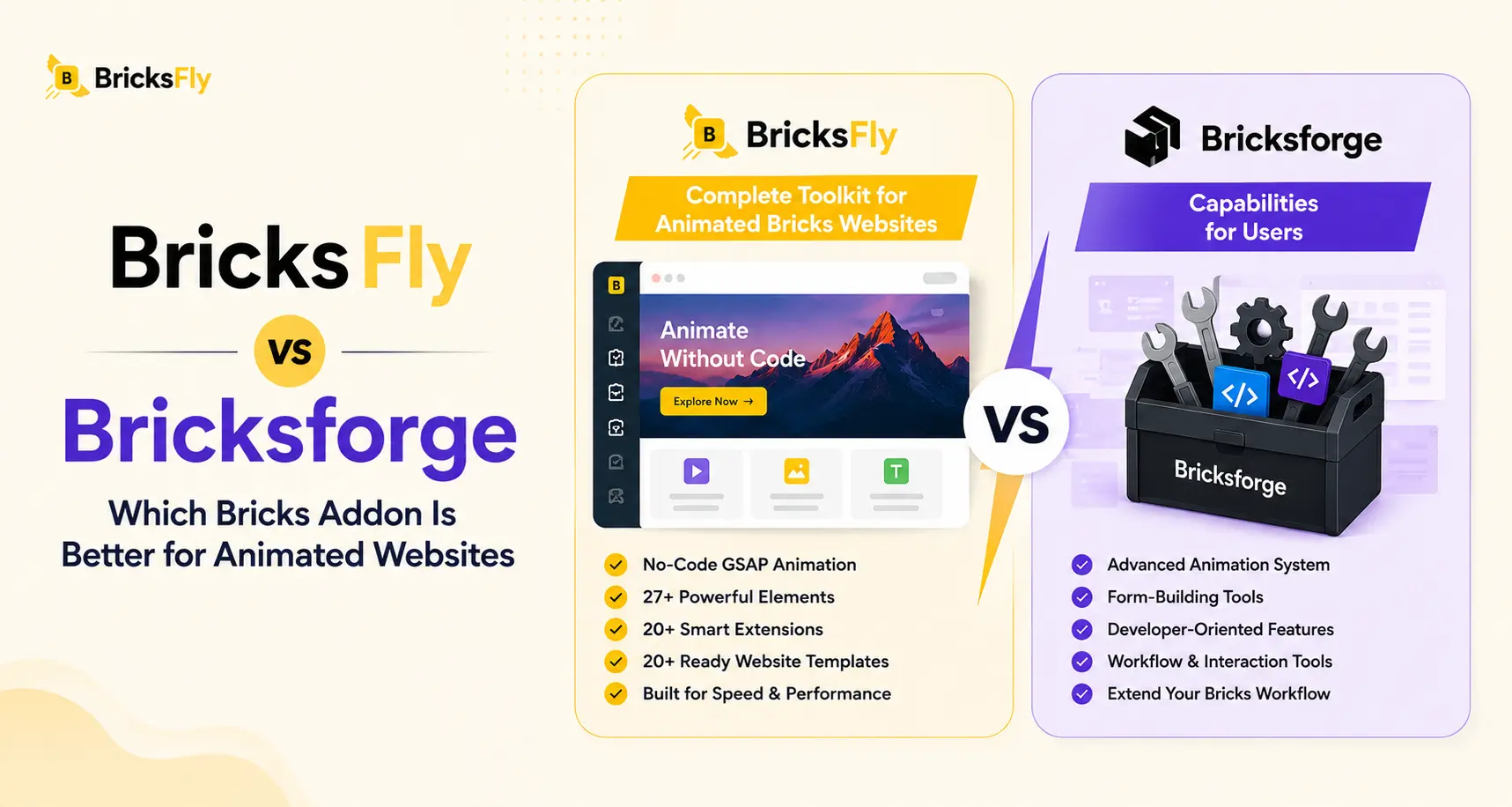
BricksFly and Bricksforge both add a lot to Bricks Builder, but they solve different parts of the website-building process.
BricksFly brings website templates, ready-made sections, Elements, Extensions, and visual GSAP animation together in one toolkit. Bricksforge extends Bricks in areas such as forms, interactions, dynamic data, API integration, GSAP animation, and backend functionality.
That difference matters when you are deciding which one belongs in your workflow.
This comparison looks at animation, templates, Elements, forms, dynamic features, pricing, and the type of projects each product fits, so you can see where the real differences are.
Quick Answer
BricksFly is the better fit for developers, freelancers, and agencies that want to build complete Bricks websites faster. It combines 30+ full website templates, 500+ ready-made sections, 30+ Elements, 17+ Extensions, and visual GSAP animation in one toolkit.
Bricksforge focuses more on specialist functionality such as Pro Forms, API Query Builder, dynamic data, Node Editor interactions, page transitions, and backend customization.
If your priority is building complete Bricks websites with templates, sections, extra Elements, Extensions, and animation in one workflow, BricksFly is the better choice.
BricksFly vs Bricksforge: At a Glance
| Feature | BricksFly | Bricksforge |
|---|---|---|
| Main Focus | Complete Bricks website-building toolkit | Extending Bricks with specialist functionality |
| Visual GSAP Animation | ✅ | ✅ |
| Full Website Templates | ✅ 30+ | Not a core library |
| Section & Page Templates | ✅ 500+ | Not a core library |
| Extra Elements | ✅ 30+ | ✅ |
| Extensions | ✅ 17+ | ✅ |
| Pro Forms | Not a core focus | ✅ |
| Visual Interaction Builder | Animation-focused visual controls | ✅ Node Editor + Panel |
| API Query Builder | Not a core focus | ✅ |
| Dynamic Data Tools | Not a core focus | ✅ |
| Page Transitions | Not a core focus | ✅ |
| Backend Customization | Not a core focus | ✅ |
| One-Click Demo Import | ✅ | Not a core focus |
| Cross-Domain Copy & Paste | ✅ | Not a core focus |
| Best Fit | Developers, freelancers, and agencies building complete Bricks websites | Projects that need specialist forms, API integrations, dynamic data, interactions, or backend features |
BricksFly currently lists 30+ full website templates, 500+ sections, 30+ Elements, and 17+ Extensions. BricksForge currently lists features including Pro Forms, Node Editor, API Query Builder, GSAP tools, page transitions, and dynamic functionality.
The Biggest Difference Is the Workflow
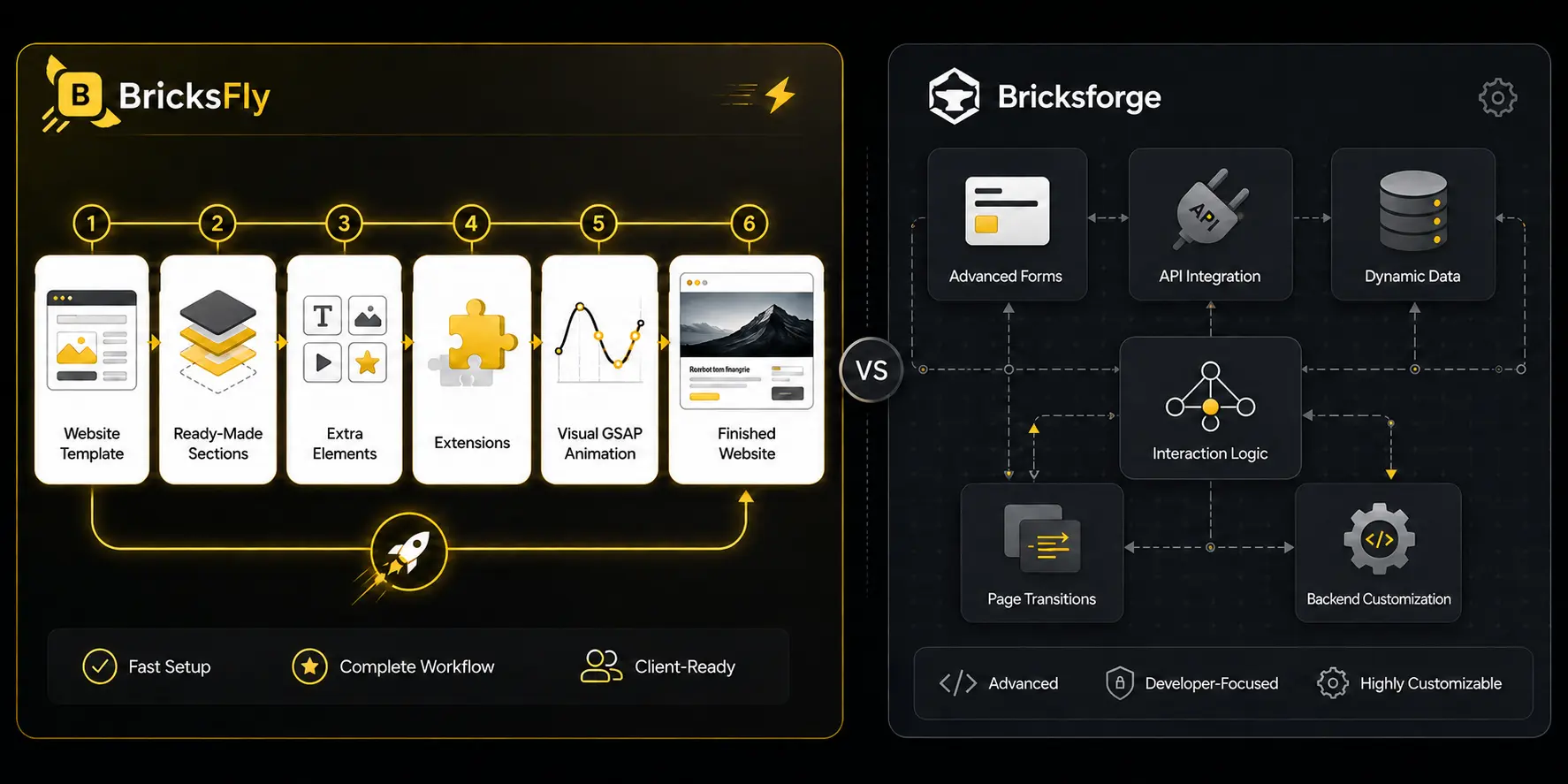
This is the part that matters most.
Imagine you have just opened Bricks for a new five-page client website.
You need a homepage, services page, about page, contact page, a few reusable sections, some extra Elements, and animation.
With BricksFly, you can start from a complete website template, import the structure, replace the branding and content, add sections where needed, and then use its Elements, Extensions, and GSAP animation tools as you continue building.
The current BricksFly library includes 30+ complete website templates and more than 500 ready-made sections alongside its Elements, Extensions, and animation features.
That makes it particularly useful when your work involves building marketing websites repeatedly.
Bricksforge approaches the problem differently.
It gives you tools that become valuable when a project needs more advanced functionality inside or around Bricks. That might mean creating a complex form, pulling content from an external API, building event-based interaction logic, customizing the WordPress backend, or creating more advanced dynamic experiences.
So the difference is not really:
“Which plugin has more features?”
A better question is:
“Which plugin solves more of the work I actually do?”
Let’s focus on the next section.
GSAP Animation in BricksFly vs Bricksforge
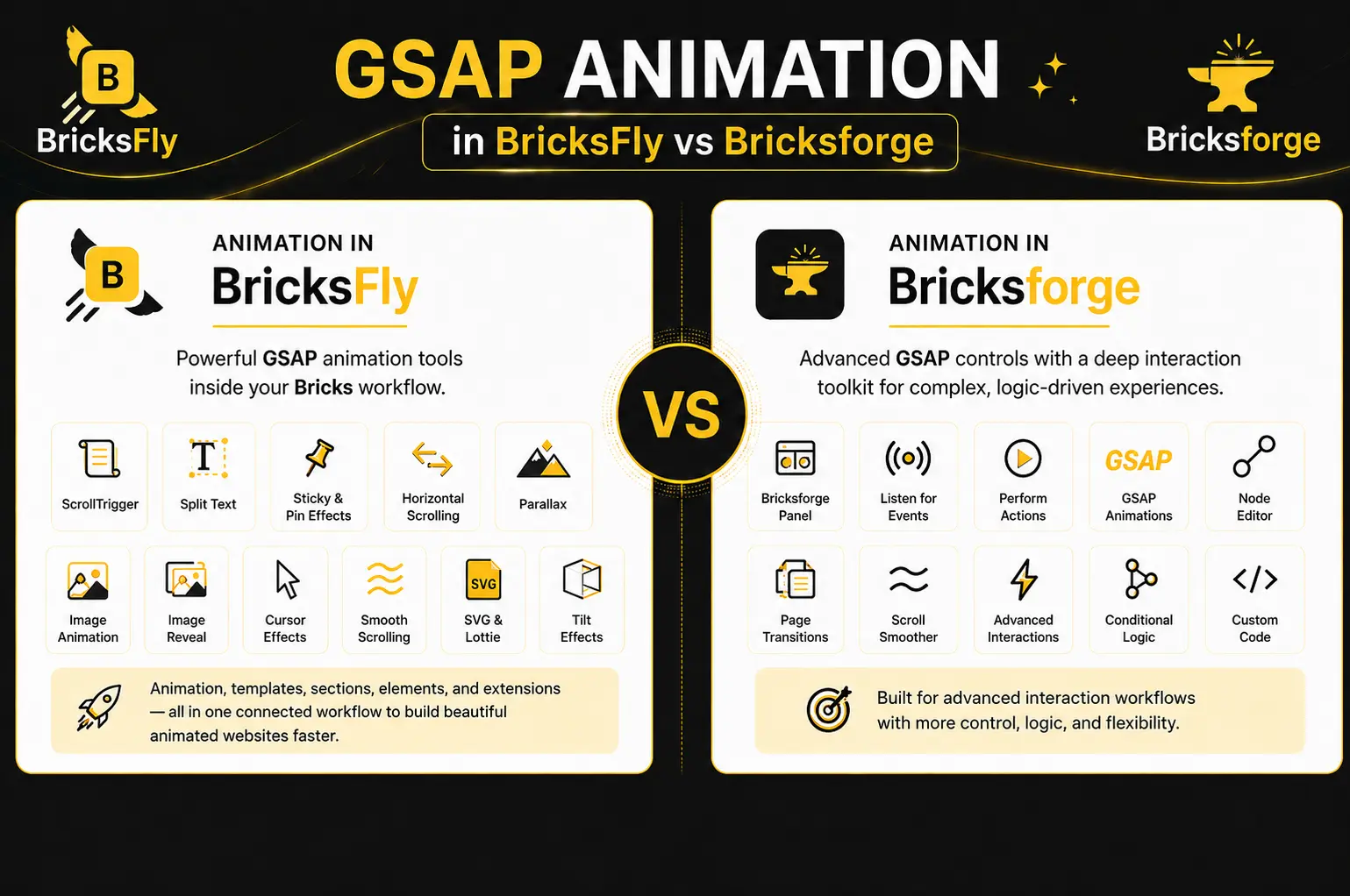
Animation is one of the areas where BricksFly and Bricksforge overlap the most.
Both provide ways to create GSAP-powered animation through a visual interface rather than relying entirely on handwritten JavaScript.
Animation in BricksFly
BricksFly includes animation features such as:
- ScrollTrigger
- Split Text
- Sticky and Pin effects
- Horizontal scrolling
- Parallax
- Image animation
- Image reveal
- Cursor effects
- Smooth scrolling
- SVG and Lottie animation
- Tilt effects
These controls are part of the wider BricksFly toolkit, alongside the template, section, Element, and Extension libraries.
That connection is useful in everyday client work.
For example, you could import a starter site, replace the hero section, add an animated heading, pin a section during scroll, apply an image reveal, and customize the rest of the page without moving to a separate animation product.
You are not choosing BricksFly only because it has animation. The bigger benefit is having animation available inside the same workflow you are already using to build the rest of the website.
Animation in Bricksforge
Bricksforge also has strong GSAP capabilities.
Its Bricksforge Panel lets users listen for events, perform actions, and create GSAP animations through a UI. Its wider interaction toolkit also includes Node Editor, page transitions, Scroll Smoother, and additional interaction-related features.
This makes Bricksforge interesting when animation is tied closely to more complex interaction logic.
If you simply want to create polished animated Bricks websites while also using ready-made layouts and website templates, BricksFly has a more connected workflow.
If you want animation as part of a deeper interaction and development toolkit, Bricksforge deserves a closer look.
Templates and Sections: Where BricksFly Saves More Build Time
Starting from scratch is not always a problem.
But doing it for every project gets repetitive.
This is probably the clearest difference between the two products.
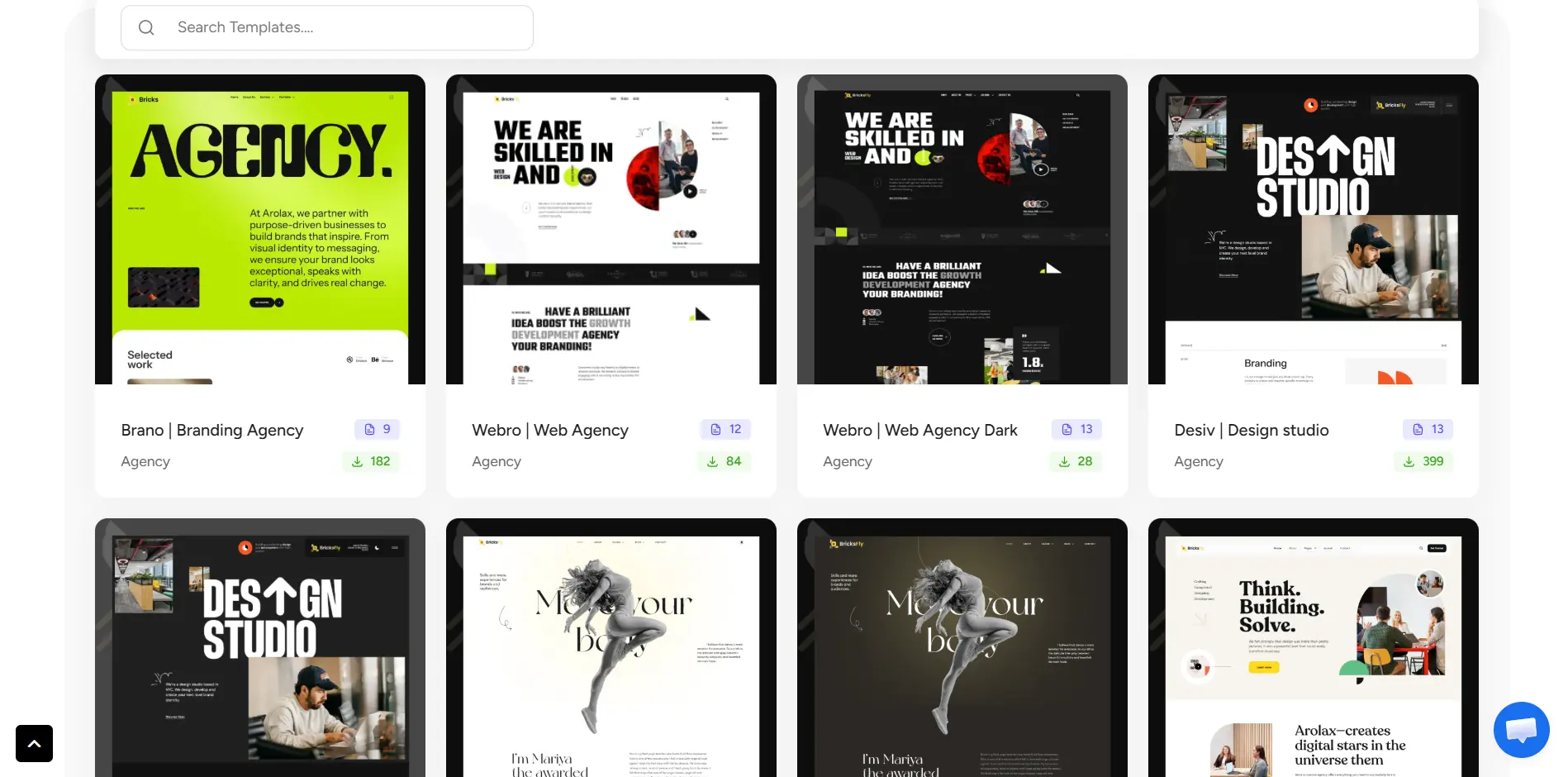
BricksFly currently provides 30+ full website templates with inner pages and 500+ section and page templates. It also supports one-click demo import and cross-domain copy and paste as part of its All Access offering.
You can start from a complete website when it fits the project or build your own layout from reusable sections.
The section library covers common parts of a website such as:
- Hero sections
- Services
- Features
- Pricing
- Testimonials
- CTAs
- Portfolios
- Footers
- Content layouts
This matters most when you build websites regularly.
A freelancer building one website every few months may not care much about saving 30 minutes on a hero section.
An agency building several client websites every month probably will.
Bricksforge is not positioned around providing a comparable full website and section template library. Its feature set is concentrated more heavily on dynamic functionality, interaction, design tools, and backend capabilities.
So if Bricks templates and reusable sections are high on your list, BricksFly has the stronger offering here.
Forms and Dynamic Work: Where Bricksforge Goes Further
This is where the comparison starts to swing in the other direction.
Bricksforge has several specialist features that BricksFly is not designed to replace.
Pro Forms
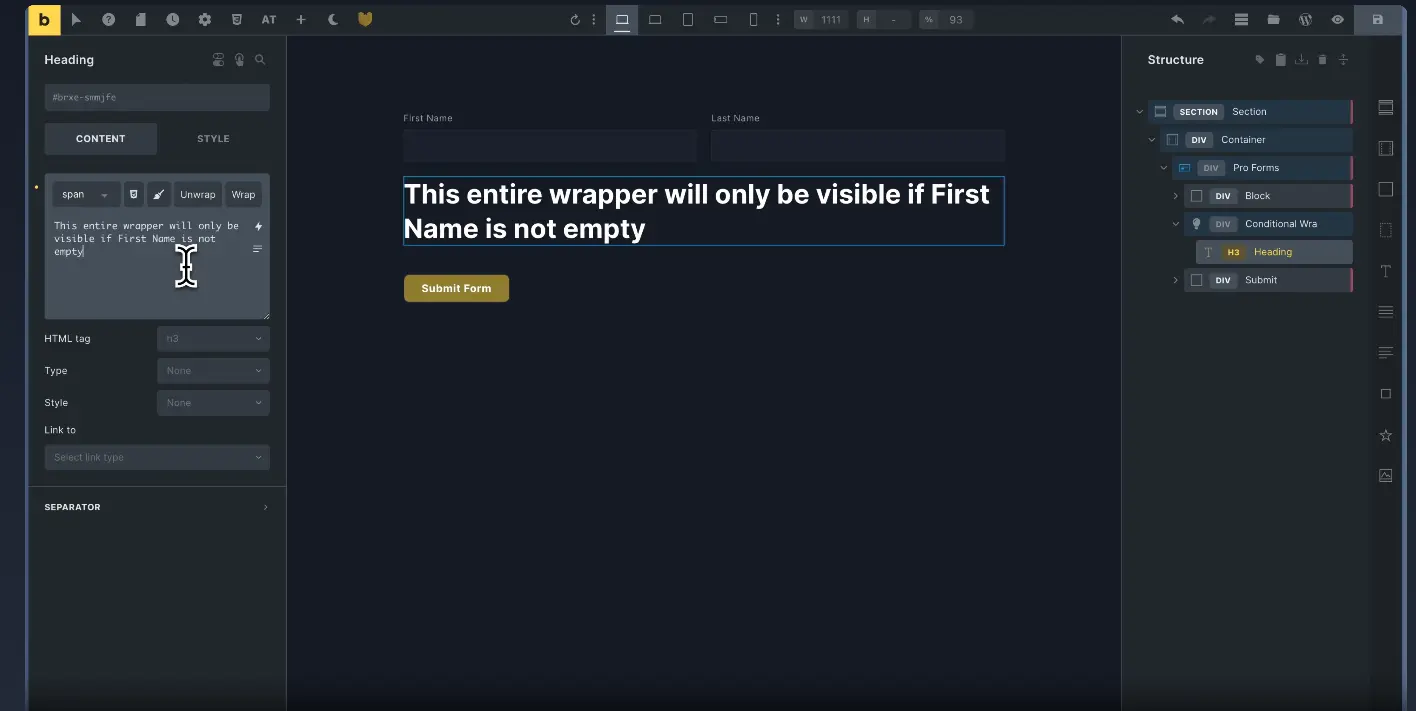
Bricksforge Pro Forms uses nestable Bricks elements, which gives you more control over how forms are structured and styled.
It currently supports features including:
- Multi-step forms
- Conditional logic
- Calculations
- Live values
- Query Loops
- CRUD operations
- PDF creation
- Webhooks
- Validation
- Repeater fields
That is considerably more than what you need for a standard contact form.
If you are building directories, user dashboards, calculators, configurators, registration systems, or websites where forms are central to the functionality, this can be a major reason to choose Bricksforge.
API Query Builder
Bricksforge’s API Query Builder can connect external REST APIs to Bricks and transform API responses into dynamic content that can be used within your layouts.
That opens up a different category of projects.
For example, you might need to display data coming from an external application instead of information stored directly inside WordPress.
That is not something a template or Element library is intended to solve.
Node Editor
Node Editor gives you a visual interface for creating interaction logic by connecting nodes.
Instead of looking at animation as an isolated effect, you can build relationships between events and actions visually.
For projects with more complicated interactions, that can be far more important than having hundreds of ready-made sections.
Page Transitions and Backend Tools
Bricksforge also includes page transitions and several WordPress administration tools.
Its current feature list includes Backend Designer, Admin Pages, Builder Customizer, Global Classes tools, form submission management, dynamic data tags, and other features that extend beyond the front-end page-building experience.
If you regularly build more application-like WordPress projects, client dashboards, dynamic sites, or heavily customized admin experiences, these features give Bricksforge a clear purpose.
What This Means on a Real Client Project
Feature lists are useful, but real projects make the difference easier to understand.
Suppose you are building a website for a digital agency.
You need:
- A polished homepage
- About and service pages
- Case studies
- Testimonials
- Pricing sections
- Contact information
- Modern scroll animation
- Some extra design Elements
In that situation, BricksFly covers a large part of the work directly.
You can start from a website template or assemble pages from sections, use extra Elements where native Bricks does not give you the layout you want, and add GSAP animation during the same build.
Now imagine a different project.
You are creating a membership-style website where users submit complex forms, update content, interact with dynamic information, and view data pulled from an external service.
The requirements have changed.
Templates may still be useful, but Pro Forms, API integration, dynamic data, and interaction logic suddenly matter much more.
That is where Bricksforge starts to make more sense.
This is why comparing these two products only by counting features does not give you a useful answer.
They solve different bottlenecks.
So, Which One Makes More Sense for You?
There is no need to overcomplicate the decision.
BricksFly Makes More Sense If You Build Websites Every Week
BricksFly is the stronger fit for freelancers, designers, developers, and agencies whose normal work is building complete Bricks websites.
You get the building blocks you are likely to reuse frequently:
- Full website templates
- 500+ sections
- Extra Bricks Elements
- Extensions
- Visual GSAP animation
- One-click template import
- Cross-domain copy and paste
This combination is especially useful for brochure websites, agency sites, portfolios, landing pages, service businesses, SaaS marketing sites, and similar projects.
The advantage is not that every feature is unique.
The advantage is that several things you normally need during the same project are available together.
Bricksforge Makes More Sense When the Functionality Is the Project
Look more closely at Bricksforge when your requirements include things such as:
- Complex forms
- API-driven content
- Advanced dynamic data
- Event-based interactions
- Node-based logic
- Page transitions
- Customized WordPress admin areas
- Client backend interfaces
Bricksforge’s current feature set is much deeper in these areas.
For those projects, choosing a plugin because it has more templates would miss the point.
You need the tool that can handle the functionality the website depends on.
How Much Do BricksFly and Bricksforge Cost
Price comparisons between WordPress plugins can become misleading quickly.
The cheapest entry plan does not tell you much if you need to use the product across ten, fifty, or hundreds of client websites.
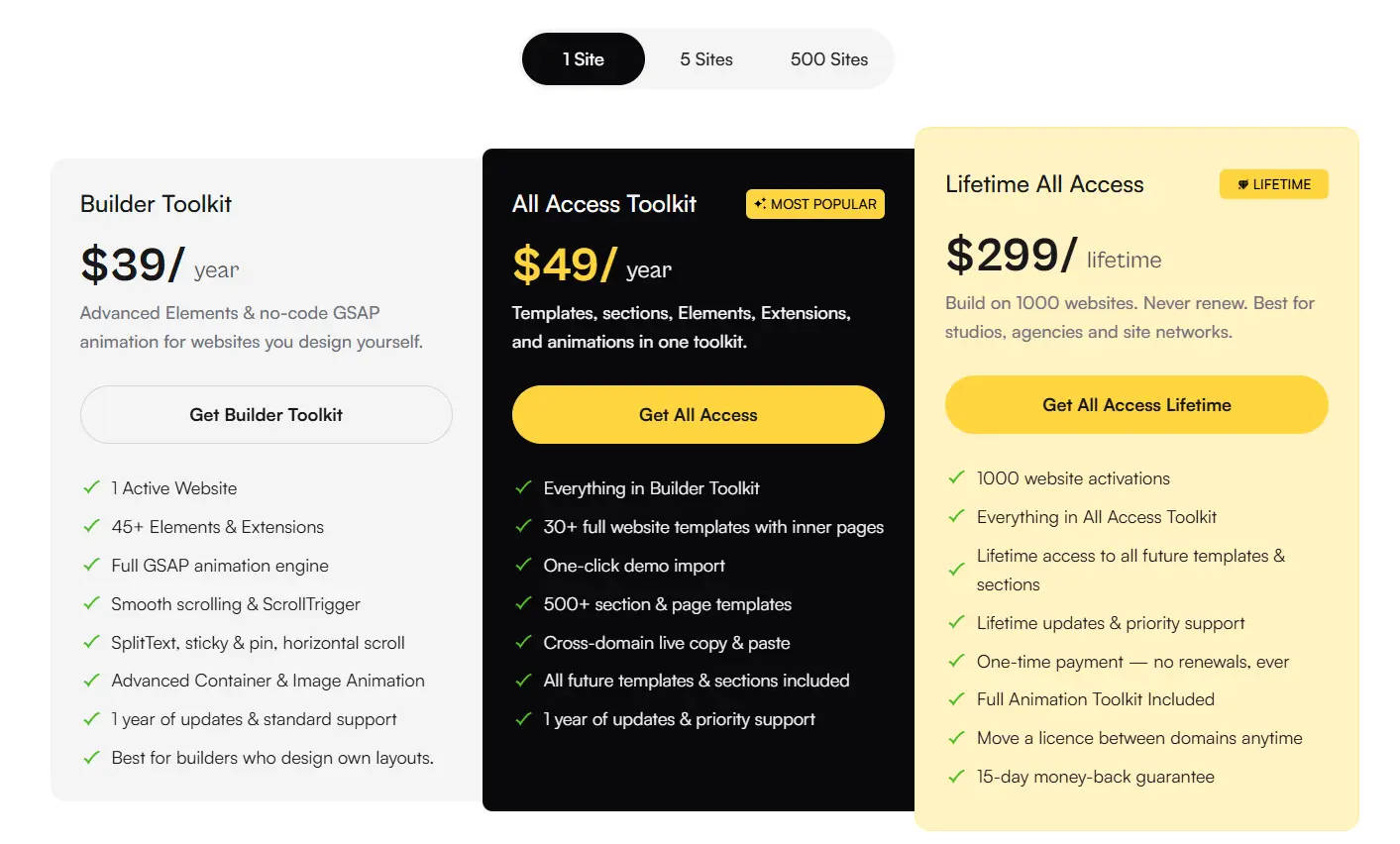
BricksFly currently offers Builder Toolkit, All Access Toolkit, and Lifetime All Access options, with licensing that changes based on website usage and access level. Its All Access plans include the template and section libraries in addition to the builder and animation tools.
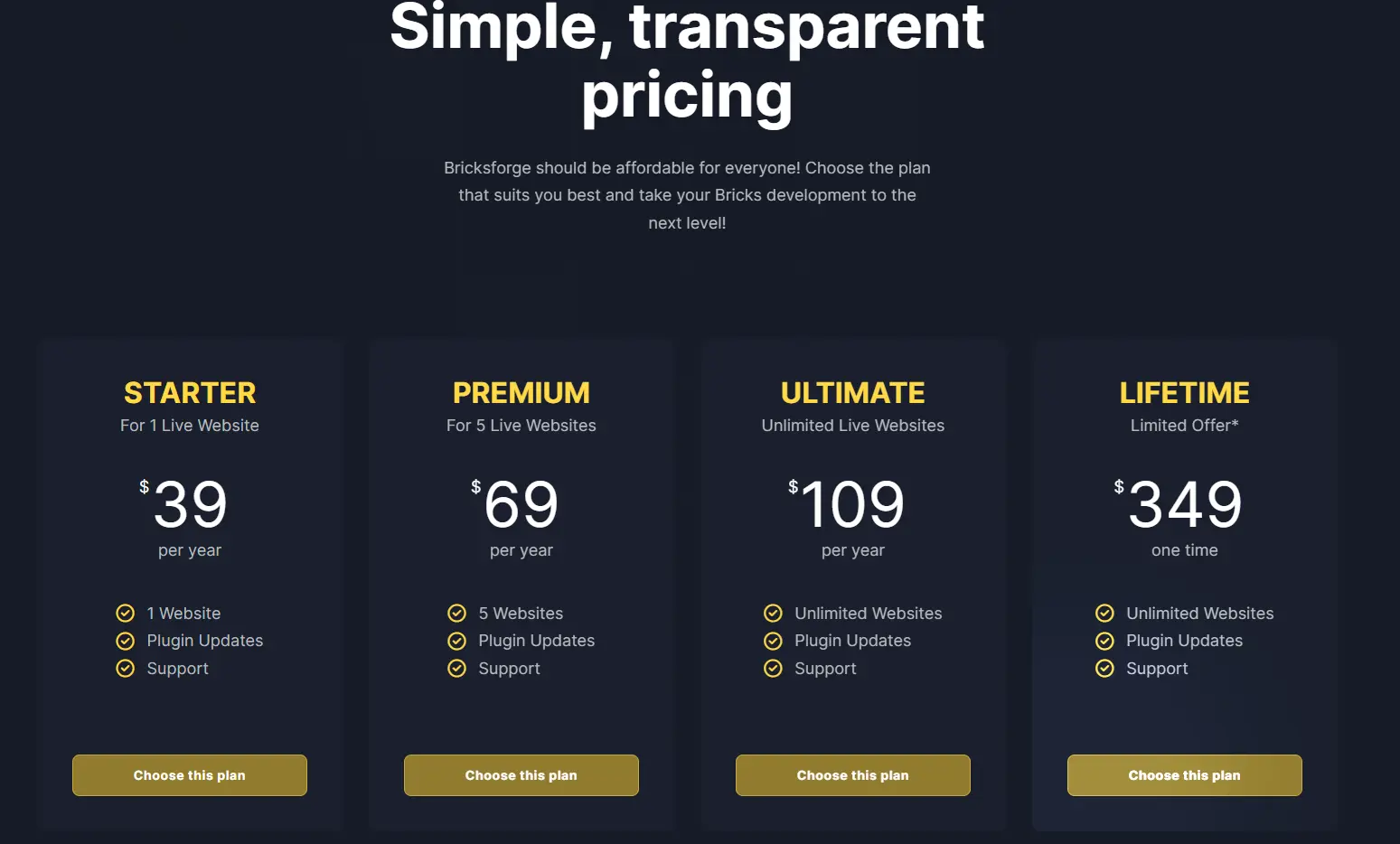
Bricksforge also uses site-based licensing. Its current Starter plan, for example, covers one live website, with additional plans available for more sites.
Before buying either one, compare:
- How many websites you need to activate
- Whether you need templates and sections
- Whether advanced forms or dynamic tools are required
- Whether you prefer annual or lifetime licensing
- Which existing plugins the new tool may replace
Promotions and pricing can change, so check both official pricing pages before making the final purchase.
Which One Should You Choose?
By this point, the difference between BricksFly and Bricksforge should be clearer. The better choice comes down to the type of projects you build most often.
Choose BricksFly If You
- Build complete Bricks websites for clients
- Want full website templates and ready-made sections
- Need extra Bricks Elements and Extensions
- Want visual GSAP animation in the same workflow
- Build agency, SaaS, portfolio, service, or marketing websites
- Want to reduce repetitive work across projects
Choose Bricksforge If You
- Build websites with complex forms
- Work heavily with dynamic data
- Need REST API integrations
- Want node-based interaction logic
- Need advanced page transitions
- Customize the WordPress backend for clients
For most freelancers and agencies building client websites with Bricks, BricksFly covers more of the everyday workflow. Bricksforge makes more sense when a project depends heavily on advanced forms, APIs, dynamic data, or custom interaction logic.
Final Verdict
BricksFly vs Bricksforge is really a workflow decision.
If you spend most of your time building complete Bricks websites for clients, BricksFly is likely the better overall fit.
Its combination of full website templates, 500+ sections, Elements, Extensions, and visual GSAP animation covers a large part of a normal website build in one toolkit.
If you build projects where the challenge is more technical, such as advanced forms, dynamic data, API integrations, custom interaction logic, page transitions, or WordPress backend customization, Bricksforge has stronger specialist tools for those jobs.
So think about your last five Bricks projects.
If most of your time went into layouts, reusable sections, client pages, Elements, and animation, BricksFly probably matches your workflow better.
If most of your time went into forms, data, logic, interactions, and custom functionality, Bricksforge is probably the more relevant choice.
That is a much more useful way to choose than comparing feature counts alone.
Frequently Asked Questions
For agencies and freelancers building complete client websites with Bricks, BricksFly is the better fit because it combines full website templates, 500+ sections, additional Elements, Extensions, and visual GSAP animation in one toolkit
Bricksforge covers different needs, including advanced forms, API data, interaction logic, dynamic functionality, and backend tools.
Yes. BricksFly provides visual controls for its GSAP animation features, and Bricksforge also provides UI-based GSAP animation through Animation Controls and the Bricksforge Panel.
BricksFly currently includes 30+ complete website templates with inner pages and 500+ section and page templates.
Bricksforge’s current feature set is focused on extending Bricks functionality rather than providing a comparable full website and section library.
Not in every situation.
There is overlap around animation and some builder functionality, but Bricksforge includes specialist features such as Pro Forms, Node Editor, API Query Builder, page transitions, and backend tools.
If your main work is building complete Bricks websites, BricksFly can cover much of the everyday workflow. If a project requires one of Bricksforge’s specialist features, the two can serve different purposes.